
Software/ Electronic Records
Versatile 2026 · Electronic Records
Electronic Records Management
Email, documents, spreadsheets, PDFs, scanned images — governed in Versatile's own repository, or right where they live in SharePoint, OneDrive, and file shares. Either way: one retention truth, folder-level security, and an audit trail down to views.
Trusted by
- City & County of Denver
- University of Washington
- Highmark Inc.
- Inter-University Council of Ohio
- …and a global pharmaceutical company
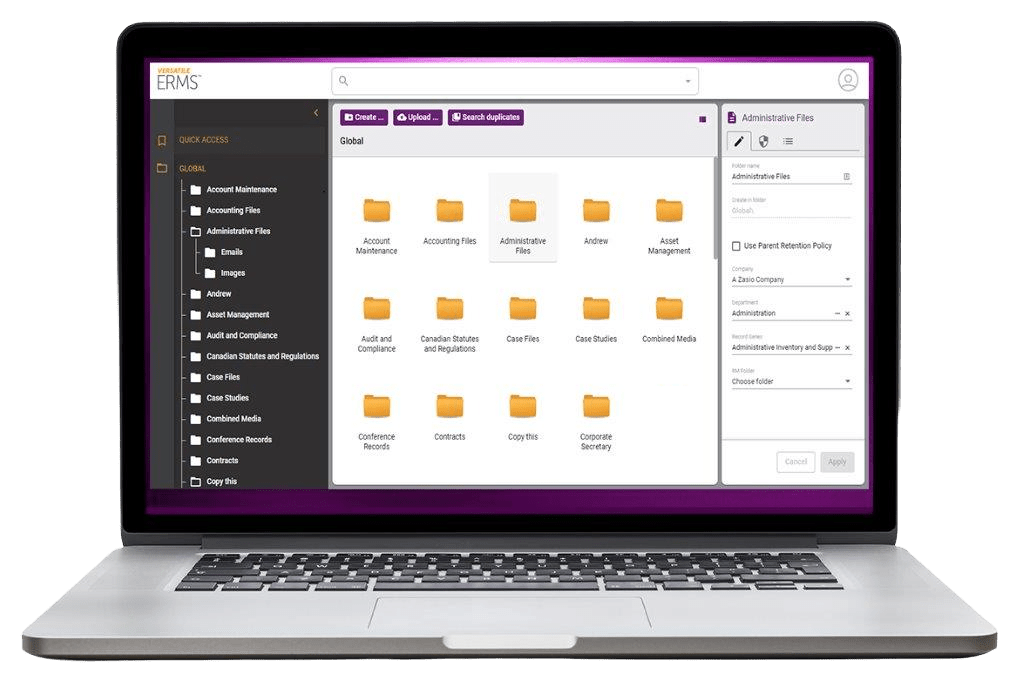
A records repository that behaves like a file explorer
Manage email, word processing documents, spreadsheets, PDFs, scanned images and more. Apply retention, holds, and disposition on unstructured documents, whether managing in-place or moving them into a long-term repository. Versatile 2026, with Electronic Records Management features, makes it possible — even easy — to apply retention policies to unstructured files and digital assets across file shares, cloud repositories, applications and data stores. Replace your shared drives or manage in place.
Versatile helps organize and store electronic records in a central repository while also offering workflow management features to maximize efficiency. The software handles it all: emails, documents, spreadsheets, PDFs, scanned images, and more. It can integrate directly with your desktop or it can be accessed through a standard web browser, allowing for easy deployment company-wide so users can simply drag, copy, paste, and save directly to Versatile. Navigating folders and electronic records has never been easier.
Uncontrolled information creates risk. Records scattered across file shares, cloud platforms, applications and personal workspaces make it difficult to enforce retention, respond to audits and confidently manage compliance obligations. Versatile brings order to that chaos: centralize governance, automate retention, improve accessibility, and maintain control of critical records throughout their lifecycle — moving from manual records management to policy-driven governance, where content is organized to business needs, retention schedules apply to folders, and records are consistently managed from creation through final disposition. Electronic Records Management comes in two tiers — Standard and Advanced — and the chart further down shows exactly what separates them. Both deploy in as little as an hour, on the desktop and in the browser.
Familiar from the first click
Folder tree, drag-and-drop upload of files or whole folders, copy, move, shortcuts — in the desktop client or any browser. Content searching reaches inside the documents themselves; on SaaS that means storing them in the database, up to 512 GB.
Revision History Advanced ERM
Store and edit working documents with complete revision history — every revision retained with who and when. Preview any earlier version, or put the document back to it. The insurance policy for the afternoon somebody overwrites the contract.
Audit Trail
Automatically track every addition, update, deletion — and viewing — of a document; administrators can search activities by user, date, function, or department. Check-out locking stops silent overwrites.
Folder-Based Security
Folder-level permissions with inheritance, per-item overrides, and automatic record declaration — control who can view, add, or change anything. Security groups add the other half: what each group is allowed to do, function by function.
Retention set once, applied always
Predefine retention policies for each folder ahead of time and documents inherit them on the way in, so users drag and drop without stopping to assign retention values or make a policy decision they aren't qualified to make. Destruction dates calculate themselves the moment a document is filed — the calculation is the system's job, not the user's, and nobody looks anything up.
Email becomes records
Capture email messages automatically or manually and classify them as records. Versatile 2026 makes it easy by tapping into the way you already organize email in folders — pick the Outlook folders and rule-based capture files messages into the repository, where retention and destruction apply automatically. There's no need to classify them from memory. And if collaboration causes you headaches, Versatile 2026 can fix that too: your team can share, search, and link emails from a secure, central repository. Microsoft Office compatible — integrate directly with Windows applications, such as Microsoft Outlook, Outlook 365, Excel and Word.
Transient or official, declared
Use commit and approve options to differentiate transient and official documents. Then use the calculated disposition details applied by your retention policies to easily find, group and manage the destruction of official documents in an auditable way — only what you declare carries the disposition, so destruction batches are built from official documents.
Customizable Fields
Customizable fields: create text, memos, check boxes, drop-downs and custom list user-defined fields for the custom metadata your records actually need, on documents and on folders. They search and export exactly like the built-in ones.
Profiles Advanced ERM
Which fields are visible and which are required, varied per user or group instead of one setting for everyone — so a team's screen asks for what that team needs and nobody else wades through it. Hide and require fields to streamline data entry, and customize the default settings a new user starts with, making records management more consistent and efficient.
Legal Holds Advanced ERM
Suspend disposition indefinitely so nothing is destroyed while a matter is live — items requiring delayed disposition stay exactly where they are. Holds maintain audit details that reflect when a hold was required, when it was released, and who was involved.
Folder Rules Advanced ERM
Automate folder creation, document routing, notifications and other routine tasks with folder rules based on user actions. When a document is added, moved, or reaches a date, Versatile acts on its own — file it, set a status, flag the record, email the right person. Nobody is asked and nobody has to remember.
Workflow Templates Advanced ERM
Elevate the ability to track open activities and more complex processes with workflow templates, including common task management functionality and auditing. Assign tasks, set due dates, capture decisions and sign-offs, report on progress, and see what is stuck. Where the rules above are the machine acting, this is people acting — and every step is journaled.
Scanned images become records
Manage images as records with a retention and destruction policy. Scan directly into Versatile 2026 — TWAIN and WIA scanners, document feeders, duplex, with a built-in image editor for cleanup — or store existing images to allow consistent access and security control alongside all other electronic records.
Or govern documents where they already live
Integration with SharePoint, Google, OneDrive, Box & More Advanced ERM
ERM easily integrates with popular content management repositories and collaboration tools. Versatile 2026 seamlessly integrates with Box, Dropbox, network file shares, Microsoft OneDrive, Google Drive, and SharePoint resources (on-premises and Online) — plus FTP and SQL databases — applying retention, holds, and disposition to content in place. We can build links to other systems as needed. Manage your documents without moving them! No migration project required to get governed.
Multiple interface options, flexible roll-out
Desktop — install Versatile 2026 directly on your desktop for seamless integration with Windows File Explorer. Web browser — store and access electronic documents stored in Versatile 2026 from any standard web browser, no install required; easy to deploy company-wide. Deploying Versatile 2026 is not a mission to Mars — you can be up and running in a couple of hours. The architecture is straightforward yet scalable, with both desktop and browser interfaces available.
Organize and store electronic records easily with auto-calculated retention dates, comprehensive searching, legal holds, and audit trails. Versatile 2026 with Electronic Records Management is built to help your organization do exactly that.
Two tiers, one truth
Electronic Records Management is sold as Standard or Advanced — one or the other, never both. Standard is the complete electronic records program. Advanced adds ten capabilities for records environments that need deeper control, starting with the choice to govern documents without ever moving them.
Standard ERM 31 features
The complete electronic records program: digital content managed in Versatile, retention calculated automatically from the folder, folder-based and role-based security, record series management, disposition processing, customizable fields, duplicate content search, content searching inside the documents themselves, and the places people actually work — the web browser interface, Windows File Explorer, Microsoft Office, and email management for Microsoft 365 and Gmail.
Advanced ERM 41 features
Everything in Standard, plus the other architecture — integration with SharePoint, Google, OneDrive, Box and more, governing that content without moving it. Then Legal Holds, disposition approval workflow, folder rules, workflow templates, revision history, country-based retention, required fields by retention policy, profiles, and advanced search.
| Product features | Standard 31 features | Advanced 41 features |
|---|---|---|
| Manage Digital Content | ✓ | ✓ |
| Drag-and-Drop Filing | ✓ | ✓ |
| Folder-Based Retention & Ownership | ✓ | ✓ |
| Automatic Retention Calculation | ✓ | ✓ |
| Smart Search & Filters | ✓ | ✓ |
| Folder & Document Title Search | ✓ | ✓ |
| Recent Items | ✓ | ✓ |
| My Collections | ✓ | ✓ |
| Shared Collections | ✓ | ✓ |
| Retention Policy Management | ✓ | ✓ |
| Folder-Based Security | ✓ | ✓ |
| Single Sign-On | ✓ | ✓ |
| Audit Trail | ✓ | ✓ |
| System-Wide Field Defaults | ✓ | ✓ |
| Personal Screen Preferences | ✓ | ✓ |
| Reporting & Report Designer | ✓ | ✓ |
| Customizable Dashboards | ✓ | ✓ |
| Automatic Email Notifications | ✓ | ✓ |
| Multiple Language Options | ✓ | ✓ |
| Flexible Deployment | ✓ | ✓ |
| Role-Based Security | ✓ | ✓ |
| Record Series Management | ✓ | ✓ |
| Disposition Processing | ✓ | ✓ |
| Duplicate Content Search | ✓ | ✓ |
| Extended Folder Properties | ✓ | ✓ |
| Customizable Fields | ✓ | ✓ |
| Content Searching | ✓ | ✓ |
| Windows File Explorer Integration * | ✓ | ✓ |
| Web Browser Interface | ✓ | ✓ |
| Microsoft Office Compatible * | ✓ | ✓ |
| Email Management | ✓ | ✓ |
| Integration with SharePoint, Google, OneDrive, Box & More | — | ✓ |
| Legal Holds | — | ✓ |
| Disposition Approval Workflow | — | ✓ |
| Folder Rules | — | ✓ |
| Workflow Templates | — | ✓ |
| Revision History | — | ✓ |
| Country-Based Retention | — | ✓ |
| Required Fields by Retention Policy | — | ✓ |
| Profiles | — | ✓ |
| Advanced Search | — | ✓ |
* On-premises deployment only. A SaaS customer does not receive a reduced version of these features; they are not available.
Fields, three deep
System-wide field defaults for everyone, then Customizable Fields of your own — and at Advanced, Profiles, which vary what is visible and required per team instead of one setting for the whole company.
Search, three deep
Smart Search and filters across everything the system tracks, then Content Searching inside the documents themselves — and at Advanced, Advanced Search builds a multi-condition query once and saves it, so a hard question becomes a repeatable one.
Automation, three deep
Automatic email notifications when something happens. At Advanced, Folder Rules act without being asked — and Workflow Templates route the work to people, with due dates, sign-offs and a report on what is stuck.
Automation
Records that run their own process.
Folder rules watch record events — save, check-in, approval — and launch workflows automatically: filing, routing, notifications, even retention holds and destruction batches. Every step journaled.
Explore Workflow →Defensibility
Adds, updates, deletions — and viewings — captured in the audit trail. Disposition runs with named authorizers and e-signature verification. Deterministic retention: AI never decides what is destroyed.
Security & trust →